
Free caps, the first paid month, branching, and what happens when the database goes quiet. Prices from the vendor pages on October 28, 2026.
On this page
The short answer
Neon is the Postgres to start on when the database should sleep between requests. The Free plan includes 100 CU-hours, 1 GB of storage per project, and 10 branches, and compute suspends after 5 minutes. Supabase is the one to start on when you want Auth, files, and Realtime in that same project. Supabase Free includes 500 MB of database size, and Supabase Pro is $25 a month and does not pause.
What Neon and Supabase each include
Neon vs Supabase is a Postgres choice with a product choice stuck to it. It lives on the backend and stack hub. The reader here is a solo founder, often with an app an assistant just helped build, who needs a connection string this week and a bill that still makes sense when the app is quiet.
Neon sells Lakebase Postgres. Compute can suspend. Storage grows. Branches are copy-on-write. The same pricing page, read on October 28, 2026, also lists Managed Better Auth, Object Storage, Functions, a Data API, and an AI Gateway. Plans are Free, Launch, and Scale. Launch and Scale have no monthly minimum. You pay for what you use.
Supabase sells a project that already contains Postgres, Auth, Storage, Realtime, and Edge Functions. Unused products cost nothing. API requests are unlimited on every plan, Free included. Plans are Free, Pro, Team, and Enterprise. This comparison stops at Pro, the first paid plan. Team starts at $599 a month and is a different purchase.
If the app is still one process on one machine, SQLite vs Postgres times both locally, including what happens when more than one worker writes. If the other hosted option is Firestore, the bill at 1,000, 10,000, and 50,000 users is in Supabase vs Firebase. The TypeScript ORM in front of either connection string, measured on one small schema, is Drizzle vs Prisma.
Free tier and the first paid price
Every number in the table is from the Neon pricing page, the Neon plans page, the Supabase pricing page, or the Supabase disk-size page, all read on October 28, 2026. Where a page does not publish a figure, the cell says so. Scale, Neon’s higher plan, is $0.222 per CU-hour with the same $0.35 storage price. It is the plan with the SLA. It is not the entry price, so it is not a column.
A CU is about 4 GB of RAM, plus CPU and local SSD. Neon states that 0.25 CU for 4 hours is 1 CU-hour, and that 100 CU-hours is enough to run a 0.25 CU compute for 400 hours in a project.
| Limit | Neon Free | Neon Launch | Supabase Free | Supabase Pro |
|---|---|---|---|---|
| Price | $0 | Usage only. No monthly minimum. Invoices under $0.50 are not collected | $0 | From $25 a month, charged up front |
| Projects | 100 | 100 | 2 active. Paused projects are extra | Each project has its own compute. One Micro is covered by a $10 credit |
| Postgres storage | 1 GB per project, 20 GB across the account | $0.35 per GB-month. No hard size cap | 500 MB database size. Disk is a fixed 2 GB | 8 GB disk included, then $0.125 per GB |
| Compute | 100 CU-hours per project. Autoscaling up to 2 CU (8 GB RAM) | $0.106 per CU-hour. Autoscaling up to 16 CU (64 GB RAM) | Shared CPU, 500 MB RAM | Micro is shared compute, 1 GB RAM, 60 direct connections, 200 through the pooler, $10 before the credit |
| When it is idle | Suspends after 5 minutes. Cannot be turned off | Suspends after 5 minutes. Can be turned off | Pauses after a week of low activity. Restore is a button | Does not pause |
| Branches | 10 per project. Extras are not sold | 10 included, then $1.50 per branch-month | Not included | Micro preview branch starts at $0.01344 per hour. The $10 credit does not apply |
| Egress | 5 GB public network transfer per project | 500 GB per project, then $0.10 per GB | 5 GB egress and 5 GB cached egress | 250 GB egress, then $0.09 per GB. 250 GB cached egress, then $0.03 per GB |
| Auth | Managed Better Auth, up to 60,000 MAU | Up to 1,000,000 MAU. No per-MAU price is published past that | 50,000 MAU | 100,000 MAU, then $0.00325 |
| Files | 5 GB Object Storage per project | $0.023 per GB-month. No per-operation charge | 1 GB. Max upload 50 MB | 100 GB, then $0.0213 per GB. Max upload 500 GB |
| History | 6 hours, capped at 1 GB of changes, no charge. 1 manual snapshot | Up to 7 days. Default window is 1 day. Instant restore is $0.20 per GB-month | Automatic backups are not included | Daily backups kept 7 days. Point-in-time recovery is $100 a month per 7 days |
Two Supabase storage numbers are easy to mix up, so here is how they were taken. The pricing page lists Free as 500 MB of database size. The disk-size page says a Free project has a fixed 2 GB disk, and that disk does not autoscale. Database size is the data. Disk size is the data plus WAL and system files. Passing 500 MB of database size can put the organization under a fair-use restriction that returns HTTP 402, based on the average daily size over the billing period, not the live size. Filling the 2 GB disk is a different failure: at 95 percent the project goes read-only, and if the disk fills completely Postgres shuts down until you upgrade. WAL can fill that disk even when the tables are small.
On Neon Free, passing 1 GB in a project, or 20 GB across projects, blocks writes that would grow storage. The data is not deleted. Running out of the 100 CU-hours, or the 5 GB of public network transfer, suspends compute until the next billing period or an upgrade. That data is not deleted either.
Supabase prices a second project in the open. A Pro organization with two Micro projects is $25 plus $10 plus $10, minus the $10 credit, which is $35. One Micro project, before any usage past the included quotas, is $25. Spend caps are on by default on Pro. You turn the cap off when you want usage past the quotas to bill instead of restrict.
What 100 CU-hours costs on Launch
This is a price reading. We did not run these databases, and we did not open an invoice. The arithmetic uses only rates printed on the pages above.
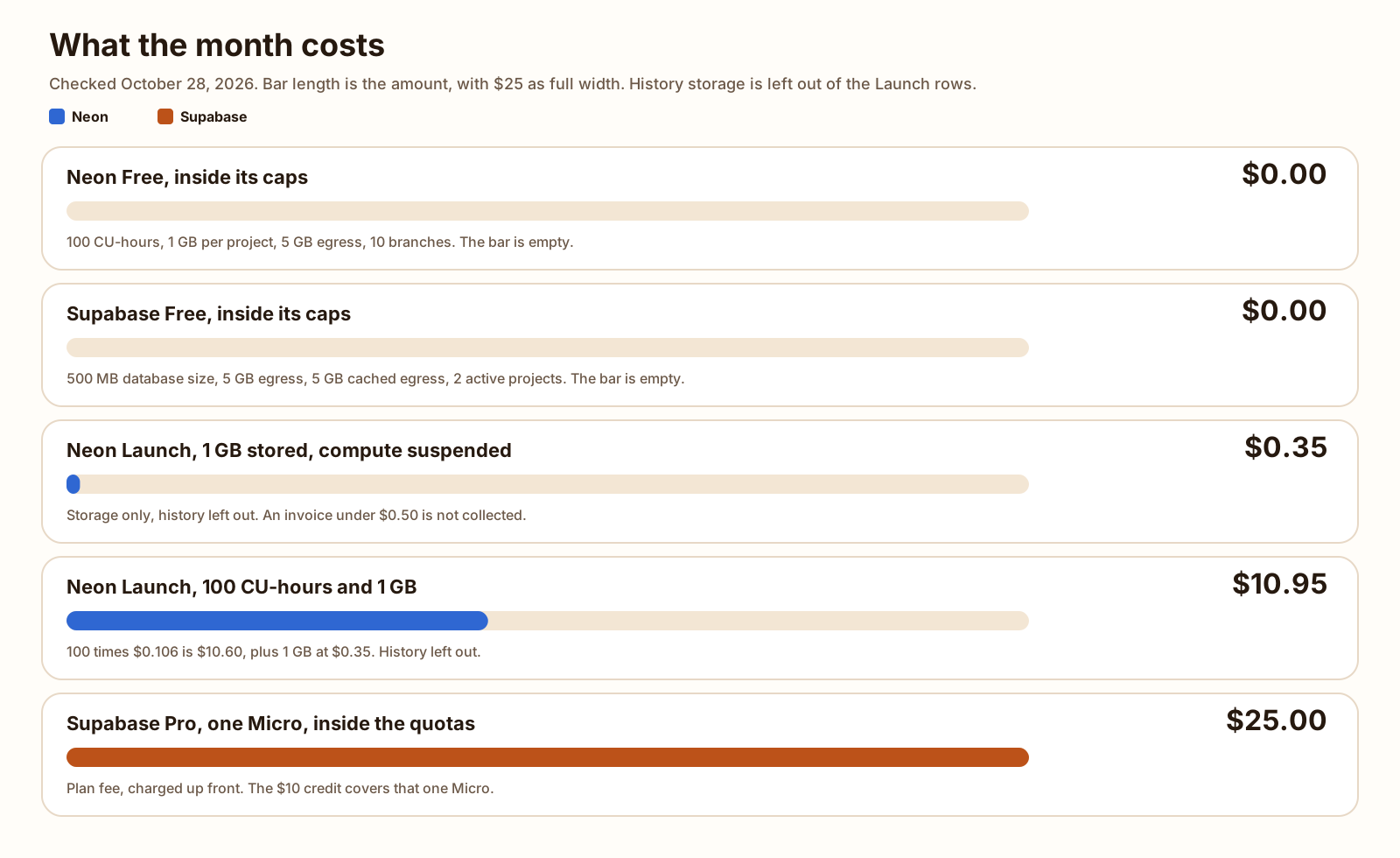
The shape is one project, 1 GB of root storage, compute awake for 100 CU-hours, no child branch, egress left out, and instant-restore history left out.
100 CU-hours is the whole Neon Free compute allowance. Neon says 0.25 CU for 4 hours is 1 CU-hour, and that 100 CU-hours runs 0.25 CU for 400 hours. 0.25 times 400 is 100. Those 400 hours do not have to be a block. Scale-to-zero means they can be scattered through the month. This post does not guess how many hours a calendar month contains, because the plans page does not use that number here.
On Launch, 100 CU-hours times $0.106 is $10.60. Root storage of 1 GB times $0.35 is $0.35. Those two lines are $10.95.
History is not in the $10.95. Instant restore on Launch is $0.20 per GB-month of change history, and the default window on a paid project is 1 day. History size follows writes. It is not the same number as the size of the database. Neon’s own light-usage example prices 1 GB of history at $0.20, next to 2 GB of root storage at $0.70, 1 GB of child storage at $0.35, and about 10 CU-hours at $1.06. They add that example to $2.31. 1.06 plus 0.70 plus 0.35 plus 0.20 is 2.31. That example is theirs. It is a check that the rates add, not the shape in the $10.95 bar.
The idle shape is the same 1 GB with compute suspended the whole time. Suspended compute accrues no CU-hours, so compute is $0. Storage is still $0.35. Neon does not collect an invoice under $0.50, so that storage line, on its own, is not collected. History could push the invoice over $0.50. This total does not include a history figure, because the pages do not give one for an idle database.
Supabase Free cannot hold the 1 GB shape. The database size quota is 500 MB. A database under 500 MB, with egress, cached egress, files, and monthly active users inside the Free caps, is $0 until the project is paused. Supabase Pro for one Micro project, inside the included disk, egress, files, and MAU quotas, is $25. The pricing page says a single database-only project on Micro costs $25 a month before usage past those quotas. Pro is charged up front, whether or not anyone queries.
-
$0.00
Neon Free or Supabase Free, inside that plan's own caps
-
$0.35
Neon Launch, 1 GB stored, compute suspended, history left out
-
$10.95
Neon Launch, 100 CU-hours and 1 GB of root storage, history left out
-
$25.00
Supabase Pro, one Micro project, inside the included quotas
The next Supabase compute size is Small, $15 before the same $10 credit, so $5 more than Micro. The $25 figure stays on Micro. Small is still shared compute, with 2 GB of RAM. It is not a load test. A chatty app can run out of the 60 direct connections on Micro before it runs out of disk.
Branching
Neon branches on every plan, Free included. A branch starts from the parent at the moment you create it, and creation time does not grow with the size of the data, because nothing is copied up front. Writes land on the child. The parent stays as it was. Child storage starts at $0 and grows with those writes, capped at the branch’s data size. Root storage is billed on the full data size.
Free and Launch include 10 branches per project. Extra branches are not sold on Free. On Launch they are $1.50 per branch-month, which Neon rounds to about $0.002 an hour. Their example: two extra branches kept for 5 hours each is 10 branch-hours times $0.002, about $0.02. That fee is not the whole cost. Each branch has its own compute, and that compute counts toward CU-hours. A read replica is another compute. Paid projects can go to 5,000 branches. The $1.50 line starts at branch 11.
Supabase does not include branching on Free. On Pro, a branch is a separate environment with its own API credentials, Auth settings, Storage settings, and Edge Functions. It does not start with your data. The branching guide says that is deliberate. A GitHub branch builds the schema from migrations. A dashboard branch can turn on Include data, or you can seed it. Preview branches are deleted when the pull request merges or closes. Persistent branches are not.
There is no separate Supabase branch fee. You pay for what the branch uses. A preview branch on the default Micro size starts at $0.01344 per hour. Compute credits do not apply to branching compute. Branch usage counts toward the plan quotas, and branches are not covered by the spend cap.
Put the published hourly rates next to each other for 24 hours, and label what each rate buys. 24 times $0.01344 is $0.32256, which is $0.32 to the nearest cent. That is a Supabase Micro branch for a day, and the $10 credit does not pay it. Neon’s extra-branch rate is about $0.002 an hour, so 24 times that rounded rate is $0.048, and it starts only after the 10 included branches. The Neon branch still has its own CU-hours on top. If that compute suspends, those CU-hours can be $0. The rates are not a single winner. Neon’s included branches already hold a copy of the parent data. Supabase’s hourly rate is the compute for an empty branch, unless you seed it.
Scale to zero and pausing
Neon suspends a compute after inactivity and charges no CU-hours while it is suspended. The scale-to-zero page says the inactive period is 5 minutes, and that the next query reactivates the compute within a few hundred milliseconds. This post did not time that wake. On Free the 5 minute suspend cannot be turned off. On Launch it can. On Scale the window is configurable, from 1 minute to always on. Computes larger than 16 CU do not suspend. Logical replication keeps the compute awake while subscribers are connected.
A quiet Neon database is a feature of the bill. The 100 CU-hour allowance is 400 hours at 0.25 CU. The hours the compute spends suspended do not count. A side project that is queried in bursts can stay inside Free. A compute that stays at 0.25 CU without suspending will use the allowance once 400 hours are up, and then Free suspends it until the next period.
Supabase Free does not do that. The pausing guide says a Free project pauses when it does not get enough user database activity over a week. The same page says a few user requests to the database each day, over the previous week, is typically enough to avoid the pause. Supabase emails a warning about a week before, then a confirmation when the project is paused. Restore is Resume project in the dashboard. You have a year. After that, the page says the backup may not come back. A launched app with daily traffic does not hit this. A project you leave quiet while you are still building does.
Paid Supabase projects are not paused for inactivity. The way off the pause is Pro. That is the $25, charged up front, including in a month when nobody connects.
For an app an assistant generated and you open a few evenings a week, the difference is concrete. Neon wakes on the next query. Supabase Free comes back through Resume project in the dashboard.
Stays paused
Supabase Free after a quiet week
Low activity over seven days can pause the project. Restore is Resume project in the dashboard, and you have a year.
Wakes on the next query
Neon after 5 minutes idle
Suspended compute accrues no CU-hours. The scale-to-zero page says the next query brings it back within a few hundred milliseconds. Free cannot turn the suspend off.
- 5 minutes
- no CU-hours while suspended
- Free cannot disable
Auth and file storage
Supabase Auth is part of the project. Free includes 50,000 monthly active users. Pro includes 100,000, then $0.00325 each. Total users are unlimited on both. Phone MFA is a separate add-on at $75 a month for the first project, then $10 a month for each project after that. This comparison leaves that add-on off.
File storage on Supabase is 1 GB on Free and 100 GB on Pro, then $0.0213 per GB. The max upload is 50 MB on Free and 500 GB on Pro. Realtime on Free includes 200 concurrent peak connections and 2 million messages a month. Pro includes 500 connections, then $10 per 1,000, and 5 million messages, then $2.50 per million. Edge Functions on Free include 500,000 invocations. Pro includes 2 million, then $2 per million.
Neon Managed Better Auth is included in the plan, up to a cap. Free is 60,000 MAU. Launch and Scale are 1,000,000, and the plans page says to request an increase past that. It does not publish a per-MAU price. An MAU is a unique user who authenticates at least once in the billing period. Users, sessions, and OAuth configuration sit in the neon_auth schema, so a branch carries its own auth data. The auth page says this is available in AWS regions only, and not on projects that use IP Allow or Private Networking. You enable it. You do not have to. A connection string alone is still the product.
Neon Object Storage is 5 GB per project on Free, then $0.023 per GB-month of stored volume, with no per-operation charge. Egress from those objects counts toward the same public network transfer allowance as Postgres. Neon Functions are on every plan too. Free includes 10 active capacity-hours, 400 waiting capacity-hours, and 1 million invocations per project. The paid function rates are on the pricing page. This post does not turn them into a monthly total. The AI Gateway is not on Free. On Launch and Scale it is prepaid credits.
The practical split: Supabase arrives as Auth, files, Realtime, and Postgres, and unused products cost nothing. Neon arrives as Postgres that can suspend, and the pricing page now also sells auth, object storage, and functions with their own caps. If the app already has an auth library, leave Neon Auth off and keep the connection string. If you want sign-in, uploads, and a realtime channel without assembling them, Supabase is the project that already has them.
An assistant can query either database. Keep the password out of any file you commit, including a Claude MD file at the project root. Adding a server the assistant can call is the same workflow as adding an MCP server to Claude Code. Neon’s auth page documents npx neon@latest init as the command that configures its own MCP server and skills. This post did not run that command.
How to migrate
Both are Postgres. The move is a dump, not a rewrite of the rows. Roles and grants are the part that does not come across cleanly in either direction.
Neon’s migrate-from-Supabase guide, read October 28, 2026, is pg_dump and pg_restore. Create the Neon project on the same Postgres version. Use pg_dump and pg_restore from a current client. Use the direct Supabase connection. The guide says not to dump through a pooled string.
-
Use an unpooled connection and dump the public schema.
The guide’s example dumps the public schema in custom format. Auth and storage live in other schemas. The same page says you can pass extra schema flags when you need those tables. Passing the storage schema copies tables. It does not, on that page, download the file bytes out of Storage. Treat the files as a second copy.
Dump the public schema pg_dump -Fc -v -d "postgresql://USER:PASSWORD@HOST:PORT/DATABASE" --schema=public -f supabase_dump.bak -
Restore with no-owner and no-acl.
Supabase ties ownership and privileges to its auth roles. The guide tells you to skip both on the way in, then set the roles you actually want. The sample output includes an error that schema public already exists, and then continues with the tables. Match the Postgres version before you start, so you are not restoring into a different major version.
Restore into Neon pg_restore -d "postgresql://USER:PASSWORD@HOST/DATABASE" -v --no-owner --no-acl supabase_dump.bak -
Check a count on both sides, then change the connection string.
Run the same count on Supabase and on Neon. Point the app at Neon only after those counts match. Keep the dump file until that is true. For a larger database, or a shorter outage, the same Neon page points at logical replication instead of the offline dump. This post did not time either path.
The other direction uses Supabase’s Postgres migration guide. It offers three methods: a Colab notebook, a manual dump and restore, and logical replication when both sides are Postgres 10 or newer. The guide says to use the session pooler for the dump and restore tasks. Its dump flags skip owner and privileges. It also says users and roles are not migrated, and that row level security on tables is not migrated. You turn RLS back on yourself. The guide publishes its own time estimates, starting at about 15 minutes for 10 GB. Those clocks are theirs. This post did not run a migration, so it does not repeat them as measurements.
Leaving either host is a Postgres dump. What the dump does not include, on the Supabase side, is the same gap called out in Supabase vs Firebase: Storage files are not inside the database backup. Copy them on their own.
Which one to start on
- You want Auth, file uploads, and Realtime in the project, and you are inside 500 MB of database size, 5 GB of egress, 5 GB of cached egress, 1 GB of files, 50,000 MAU, and 2 active projects: Supabase Free. A few database requests a day is what Supabase says usually keeps the week-long pause away.
- You want those Supabase products and you are past a free cap, or the project must not pause: Supabase Pro. $25, charged up front, one Micro covered by the $10 credit, 8 GB of disk included.
- You want Postgres that suspends after 5 minutes and wakes on the next query, with branches on the free plan: Neon Free, inside 100 CU-hours, 1 GB per project, 20 GB across projects, 5 GB of egress, and 10 branches.
- Neon Free’s compute or storage cap is the one you will hit, and you can live without Supabase Realtime: Neon Launch. 100 CU-hours and 1 GB of root storage is $10.95 before history. A suspended 1 GB project meters $0.35 of storage, and an invoice under $0.50 is not collected.
- You need a branch that already contains the parent rows, on the free plan: Neon. Ten branches are included. Supabase branches are a Pro feature, and they start without data unless you seed them or turn on Include data.
- You are leaving: dump with the flags above, skip owner and privileges, copy Storage files separately, and do not switch the app until a count matches on both sides.
That database bill is one cost. What the users pay you is another. How to calculate MRR is the monthly price of the subscriptions you still have, with trials, tax, and one-off fees left out. Set the $0, the $10.95, or the $25 next to that number before you treat the hosting line as the decision.
Supabase vs Firebase: the bill at 1k, 10k, 50k The monthly bill at 1,000, 10,000, and 50,000 users, from the Supabase and Firebase price lists. Blog SQLite vs Postgres, timed on one machine 100,000 inserts, a dashboard query, and 1, 4, and 8 writers, measured locally. Blog Drizzle vs Prisma: bundle size and migrations, measured Bundle size, install footprint, cold start, and the migration commands, on one small schema. BlogFAQ
Is Neon cheaper than Supabase?
On the shapes priced in this post, both free plans are $0 while you stay inside that plan’s caps. The caps differ. Neon Free allows 1 GB of Postgres per project. Supabase Free allows 500 MB of database size. Neon Launch for 100 CU-hours and 1 GB of root storage is $10.95 before instant-restore history. Supabase Pro is $25 for one Micro project inside the included quotas. An invoice under $0.50 is not collected on Neon.
Does Neon include auth and file storage?
Yes, on the pricing page checked October 28, 2026. Managed Better Auth is included up to 60,000 monthly active users on Free and 1,000,000 on Launch. Object Storage is 5 GB per project on Free, then $0.023 per GB-month. Supabase includes Auth, Storage, Realtime, and Edge Functions in every project, and unused products cost nothing. The Neon pricing page does not list a Realtime product.
What happens when a free database goes quiet?
Neon suspends compute after 5 minutes of inactivity. On Free you cannot turn that off. The scale-to-zero page says the next query wakes it within a few hundred milliseconds. Supabase pauses a Free project that does not get enough database activity over a week. You restore it with Resume project in the dashboard, and you have a year. Paid Supabase projects are not paused.
Can I branch the database on the free plan?
On Neon Free, yes. You get 10 branches per project, and extra branches are not for sale until you upgrade. Supabase does not include branching on Free. On Pro, a preview branch on the default Micro size starts at $0.01344 per hour, and the $10 compute credit does not apply to that hour.
How do I move from Supabase to Neon?
Neon publishes a pg_dump and pg_restore guide. Use an unpooled Supabase connection, dump the schema you need, and restore with the no-owner and no-acl flags. The same page points at logical replication when you need less downtime. Copying Storage file bytes is a separate job from the database dump.
Does Supabase scale to zero?
No. Supabase Free pauses after a week of low activity, and coming back is a click on Resume project. Pro does not pause. Neon scale-to-zero is a 5 minute suspend, and the next query wakes the compute.
Sources
- Neon pricing Checked
- Neon plans Checked
- Scale to zero (Neon) Checked
- Branch your backend (Neon) Checked
- About Managed Better Auth (Neon) Checked
- Migrate from Supabase (Neon) Checked
- Supabase pricing Checked
- Project pausing (Supabase) Checked
- Manage Branching usage (Supabase) Checked
- Branching (Supabase) Checked
- Understanding database and disk size (Supabase) Checked
- Migrate from Postgres (Supabase) Checked