
Stripe's recommended retry setting, Lemon Squeezy's four retries, and four emails for the notes neither page prints.
On this page
The short answer
A dunning email is the note you send when a subscription card payment fails. Send one the day it fails, one while retries are still running, a final notice before that window closes, and one more on the day you pause access. Stripe’s recommended Smart Retries setting is 8 tries within 2 weeks, and its failed-payment email is a setting you turn on. Lemon Squeezy retries a failed card four times over two weeks and emails the customer each time a payment fails.
What a dunning email is, and when it fires
A dunning email tells the customer a subscription card payment failed, and it gives them a link that can fix the card. People also search dunning emails, the same note sent more than once. The sequence further down is four.
It fires when a renewal does not clear. A customer who clicks cancel gets a different email. A reminder sent before the charge is different again. Lemon Squeezy’s recovery page says renewal reminders go out seven days before the renewal date. That reminder is not a dunning email.
Collections articles use the same word for an unpaid invoice sent to a company. This page is the card on a software subscription. The copy below is for that, and it is not a collections letter.
Stripe and Lemon Squeezy already retry the card, and each one emails the customer in a different way. The next two sections are what their docs say they do, read on October 30, 2026. I did not open a Stripe Dashboard or a Lemon Squeezy store. Where a page says “enable” or “recommended” and does not show the switch on a new account, the sentence below says that.
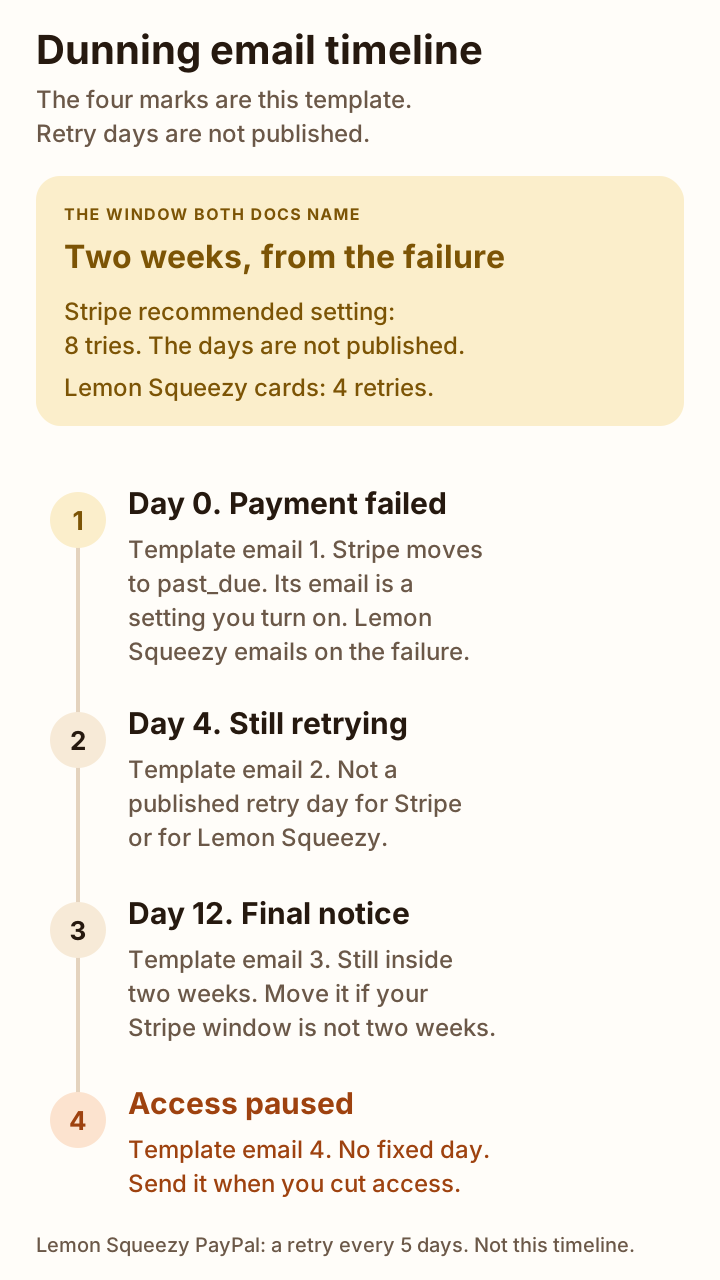
The picture is the two-week window both card docs name, and the four send points in the template. The marks are not their retry calendar.
What Stripe sends and retries by default
People also search stripe dunning and smart retries stripe. In Stripe’s docs, both point at revenue recovery: retries, customer emails, and the status the subscription takes when retries stop. Smart Retries is the retry tool. You configure it under Billing, then Revenue recovery, then Retries, which is the path on the Smart Retries page.
Smart Retries picks the times. You set how many tries, and a maximum duration. The durations on that page are 1 week, 2 weeks, 3 weeks, 1 month, or 2 months. The sentence for the recommended setting is “8 tries within 2 weeks.” The page does not say which day each try falls on. You can turn Smart Retries off and use a custom schedule of up to three retries, each a number of days after the previous attempt. The page does not print a default custom schedule. It also does not say which mode a brand-new account is on. The only default it names is that recommended setting: 8 tries within 2 weeks.
Stripe does not retry a payment when no payment method is on file, when the issuer returns a hard decline, when the card is India-issued, or when the Connect account has been disconnected. The hard decline codes on that page are incorrect_number, lost_card, pickup_card, stolen_card, revocation_of_authorization, revocation_of_all_authorizations, authentication_required, highest_risk_level, and transaction_not_allowed. For those codes, retries stay on the calendar and attempt_count still goes up, and the charge runs only after a new payment method is there. An unexecuted retry does not create a new Charge.
Card retries are the path this post covers. The same page says Stripe does not automatically retry failed non-card payment methods by default. Bank debits have their own caps once you turn those retries on.
A renewal that fails, on a subscription set to charge_automatically, moves the subscription to past_due. That is the collection methods page: the status is past_due, and the PaymentIntent is requires_payment_method or requires_action. After the retries are exhausted, that page says Stripe may mark the subscription canceled or unpaid, depending on your settings. The Smart Retries page lists four endings: cancel (status canceled), mark unpaid, leave past_due, or pause if the subscription is eligible. The pause rules for eligibility are on a separate page, and this post does not restate them.
How subscriptions work says Stripe sets unpaid only when your Dashboard settings select that outcome. The same status row says to revoke access when the subscription is unpaid, because the retries already ran while it was past_due. The past_due row on that page names canceled, unpaid, or remaining past_due as the choices after the last retry. The retries page adds pause. Neither page says which ending a new account starts with.
The first invoice is a different clock. If the first payment fails, the subscription is incomplete, and it becomes incomplete_expired if it is still unpaid after 23 hours. Those 23 hours are not the renewal window.
The failed payment email is a switch. The customer emails page says to enable “Send emails when card payments fail” on the revenue recovery settings page. The send-email page puts the same switch under Settings, then Billing, then Subscriptions and emails. When it is on, Stripe sends an email after each failed payment. The email says the subscription payment failed and offers a link to update the payment method. The link can be a Stripe-hosted page or a URL you supply. These pages do not say a new account has the switch on. They do not print the subject or the body. If the switch is off, the retries can still run, and Stripe does not email the customer about the failure.
Three nearby emails are not this sequence. If you turn on “Send emails about expiring cards,” Stripe sends one email one month before the default card expires. Renewal reminders are a separate switch, only for charge_automatically, and the page says they go out the number of days you configure. It does not print a default number of days. Reminders for an unpaid invoice, on that page, are for send_invoice, not for an automatic card charge.
The hosted link inside those emails dies in cases the customer emails page lists. For a failed renewal, the ones to read are: the subscription status changes to cancelled (that page’s spelling; the status table spells it canceled), incomplete_expired, or unpaid, or the current renewal period has expired. If your ending is unpaid or cancel, the link in Stripe’s earlier failed-payment email can be dead when you still need the customer to update the card. The fourth email in the template needs a link you know still works.
Stripe retries a specific card, in a fixed order, from the Smart Retries page. First the subscription’s default payment method, then the subscription’s default source, then the customer’s default payment method, then the customer’s legacy default source. If the subscription has a default payment method and a webhook or a form only updates the customer default, Stripe keeps charging the old card. The hosted page updates the payment method for that subscription. A link you build should do the same.
The revenue recovery page also says Stripe automatically updates a customer’s card information when they get a new card number. That sentence does not say the update replaces an email, and it does not give a rate.
To hear each failure in your own app, the Smart Retries page says to use the invoice.payment_failed webhook. attempt_count is how many attempts have been made. next_payment_attempt is when the next collection is. For accounts using automations, that page says next_payment_attempt is set on invoice.updated, not on invoice.payment_failed.
What Lemon Squeezy sends and retries by default
Lemon Squeezy’s recovery page says a failed subscription payment is retried four times over two weeks. Each time a payment fails, the customer is emailed and asked to update their billing information. During that stretch the subscription shows as past due, stays active, and the customer keeps access to the subscription’s content. When the final payment fails, the status becomes unpaid, the customer loses access to the subscription’s content, and dunning starts.
The subscription object says the same retry count in API language. past_due means a renewal failed, and the subscription goes through 4 payment retries over 2 weeks. A successful retry returns it to active. If all four retries fail, the status becomes unpaid. The recovery page and the API agree on four retries and on two weeks. Neither page lists the four days.
The managing subscriptions guide calls dunning optional: four retries, then the dunning flow. It says the update URL goes out after each payment retry and in each dunning email. The recovery page, by contrast, describes the failure email and the later dunning emails as what Lemon Squeezy sends, and it says you customize the dunning content and schedule in Recovery settings, “using helpful defaults.” The page does not print those defaults. It does not say how many dunning emails, or on which days. This post will not fill that in.
PayPal is not the card clock. The recovery page says PayPal retries a failed payment every 5 days. If the second retry fails, PayPal counts a payment failure, adds the amount to the outstanding balance, and tries again on the next billing cycle. When the failure threshold is reached, set to 2 failed billing cycles, the subscription is suspended. The two-week bar in the figure is the card path.
The subscription object records payment_processor as stripe or paypal. That field names who processed the charge. The four retries and the emails above are Lemon Squeezy’s recovery docs. They are not the Smart Retries screen in a Stripe Billing account you configure yourself. The docs checked here do not say Lemon Squeezy’s four retries are that Smart Retries setting.
Access, after the retries, is three sentences that do not match.
The recovery page says the customer loses access to the subscription’s content when the status becomes unpaid.
The subscriptions page says customers should keep access to your app or product in every status except expired. Unpaid is one of the earlier statuses on that list.
The API says that if dunning is on, your dunning rules decide whether an unpaid subscription becomes expired. If dunning is off, the status stays unpaid, and it is up to you what that means for users of your product. The expired row says customers should no longer have access to your product. The managing-subscriptions guide says the same thing about expired: the customer should no longer have access, and the subscription cannot be resumed.
Read those as different products. A file Lemon Squeezy hosts can follow the recovery page and lock at unpaid. An app you gate yourself can follow the subscriptions page and the API, and lock at expired, unless you have decided that unpaid already means locked. Email 4 has to match the rule your app implements. If you sell a hosted file and also gate an app, those two locks can happen on different days.
The update link has a short life. The managing-subscriptions guide says urls.update_payment_method expires after 24 hours, and you refresh it by reading the subscription again. Do not paste yesterday’s URL into an email. Point the email at a page in your app that fetches a new one.
| Question | Stripe | Lemon Squeezy |
|---|---|---|
| Card retries | Recommended Smart Retries setting: 8 tries within 2 weeks. Windows you can pick: 1 week, 2 weeks, 3 weeks, 1 month, or 2 months. Days not published. A custom schedule allows up to 3 retries. A new account’s selected mode was not opened for this post. | 4 retries over 2 weeks. Days not published. |
| When a retry does not run | No payment method, a hard decline, an India-issued card, or a disconnected Connect account. Hard declines stay scheduled and run only after a new card is on file. | Not stated for cards on the pages checked. PayPal retries every 5 days, and suspends after 2 failed billing cycles. |
| Email on a failed payment | Only if you enable “Send emails when card payments fail.” Then one email after each failed payment. Subject and body are not printed. The pages do not say the switch starts on. | An email each time a payment fails, asking the customer to update billing information. The body is not printed. |
| Emails after the last retry | No separate dunning series is described. The subscription follows the ending you set. | Multiple dunning emails once the status is unpaid, if dunning is on. Count and days are not printed. The API and the management guide say dunning can be off. |
| Status when the renewal fails | past_due, for charge_automatically. The first invoice is different: incomplete, then incomplete_expired after 23 hours. | past_due. The recovery page says it stays active, and hosted subscription content stays available. |
| When retries end | Your setting: canceled, unpaid, remain past_due, or pause if eligible. The docs do not say which a new account uses. Stripe says to revoke access at unpaid. | unpaid. Recovery page: hosted content locks. Subscriptions page: keep access until expired. API: expired removes access, and unpaid with dunning off is your decision. |
| What you still write | A final notice, and a note on the day access actually changes. Those are not in the docs. Skip a second failure email if Stripe’s switch is already on. | Edit the Recovery settings copy if those emails are on. Use your own sequence when they are off, or when your app locks on a different day than hosted content. |
Dunning email examples you can copy
This is a dunning email template and a payment failed email template in one sequence. Four dunning email examples, in the order you send them. The words are this template. They are not copied from Stripe or Lemon Squeezy, because those pages do not print the email.
Day 0 is the day the charge fails. Day 4 and day 12 are this file’s schedule, chosen so the final notice is still inside a two-week window. They are not days either company published. Email 4 has no day number. It goes out when you pause access, and only then.
If Stripe’s failed-payment email is already on, the customer already gets a note after each failure. You can skip email 1 and email 2 and still send email 3 and email 4, which that setting does not cover. If Lemon Squeezy’s failure emails and dunning series are on, edit those in Recovery settings instead of sending this file as a second series. Use the file when you are the one sending the mail.
Download the dunning email sequence (Markdown)
The same file is on Templates. Replace PRODUCT_NAME, AMOUNT, CARD_LAST4, UPDATE_URL, and FAILED_ON. Stop the sequence when the invoice is paid.
Subject: Your PRODUCT_NAME payment did not go through

The card payment for your PRODUCT_NAME subscription did not go through.

Amount: AMOUNT
Card ending in: CARD_LAST4
Failed on: FAILED_ON

Update the card: UPDATE_URL

We will try the charge again. If you already updated the card, you can ignore this note.Subject: Your PRODUCT_NAME card is still failing
We still have not charged the card for your PRODUCT_NAME subscription.
Amount: AMOUNT
Card ending in: CARD_LAST4
Update the card: UPDATE_URL
Retries are still running. Your access is unchanged.Subject: PRODUCT_NAME access ends if the card is not updated
We still have not charged the card for your PRODUCT_NAME subscription.
Amount: AMOUNT
Update the card before access is paused: UPDATE_URL
If the card is updated in time, the next retry can use it. If it is not, access is paused when the retries end.Subject: PRODUCT_NAME access is paused
Access to PRODUCT_NAME is paused because the card payment did not go through.
Amount still open: AMOUNT
Update the card to restore access: UPDATE_URLUPDATE_URL has to be alive when they click. For Stripe, use the hosted page for that subscription, or your own page that sets the subscription’s default payment method, not only the customer default. For Lemon Squeezy, the signed update URL expires after 24 hours, so UPDATE_URL should be a page in your app that fetches a fresh one.
Subject lines and timing
Each subject states the fact. The first says the payment failed. The second says the card is still failing. The third says access will end if the card is not updated, which is a warning, not a statement that access is already off. The fourth says access is paused, and you send it only after that is true.
| When this template sends it | Subject | |
|---|---|---|
| 1 | The day the charge fails | Your PRODUCT_NAME payment did not go through |
| 2 | 4 days later, if still past due | Your PRODUCT_NAME card is still failing |
| 3 | 12 days later, if still past due | PRODUCT_NAME access ends if the card is not updated |
| 4 | The day you pause access | PRODUCT_NAME access is paused |
Day 12 is a choice, not a measured recovery rate. A two-week window still has room before it closes. Stripe’s recommended setting is that two-week window, and Lemon Squeezy’s card retries are that two-week window. If you set Stripe to 1 week, day 12 is already late: send the final notice before the week ends. If you set Stripe to 1 month or 2 months, day 12 is early, and you can move the final notice closer to the end you configured. A custom Stripe schedule of up to three retries uses whatever day gaps you typed. Read those gaps before you copy day 4 and day 12 onto the calendar.
Do not send email 2, email 3, or email 4 after the invoice is paid. A customer who fixed the card and is active again should not get a final notice.
What to do when retries run out
Read the ending before you write email 4. On Stripe, the Smart Retries page gives you four. Cancel moves the subscription to canceled. Unpaid leaves the subscription in place, keeps generating invoices, and does not attempt payment. Stripe’s overview says to revoke access at unpaid. Leaving it past_due means you have not chosen that ending. Pause, if the subscription is eligible, stops new subscription invoices until it resumes. This post did not open a Dashboard, so it does not know which of the four your account uses. Look at Billing, then Revenue recovery, then Retries, and make email 4 match the row that is selected.
If the selected row is “leave past_due,” and your app does not lock, do not send email 4. The subject would be false. If the selected row is cancel or unpaid, send email 4 when the status actually changes, and use a link that still works. The hosted link from the earlier failed-payment email is invalidated when the status becomes unpaid or canceled. The customer emails page spells that status cancelled.
On Lemon Squeezy, the status after the four card retries is unpaid, and then dunning emails run if that series is on. The count of those emails is not in the docs. Before you send your own “access is paused” note, decide which of their sentences you implemented.
- Hosted files and license content: the recovery page says access to the subscription’s content ends at unpaid.
- Your own app, following the subscriptions page and the API: keep access through unpaid, and remove it at expired.
- Dunning turned off: the API says unpaid stays unpaid, and access is your rule. Write the email to match the rule, or do not send email 4.
- A hosted file and an app together: the locks can fall on different days. Say which product the email is about.
The signed Lemon Squeezy URL in an old email may already be dead. Twenty-four hours after it was minted, the managing-subscriptions guide says it expires. The restore link in email 4 should hit your billing page, which requests a new update_payment_method URL, and then sends the customer there.
A hard decline on Stripe will not clear on a retry until the card on the subscription is a new one. Email 1 should ask for an updated card in that case too. A later try does not charge a stolen card, a lost card, or a number the issuer rejected as incorrect_number, until a new payment method is on the subscription.
How to tell if it is working
This page has no recovery rate. Stripe’s revenue recovery page says the Dashboard has recovery analytics for failure rates and recovery rates. This post did not open that screen, and it does not reprint a number from it.
What you can count is your own list, for a month you pick. How many subscriptions entered past_due. Of those, how many are active again before the ending you configured, and how many reached that ending. The second group is the loss that came from the failed card, if the customer did not cancel on their own. Split the reason on your sheet. The formulas in how to calculate churn rate do not split it for you. They count logos and monthly recurring revenue once the customer is gone. On that sheet, a subscription that is only past due is still a customer until it is canceled or marked unpaid.
While the status is past due, the monthly price stays in MRR. How to calculate MRR is that rule, following Stripe: the failed payment does not, by itself, remove the line. The MRR vs ARR worksheet keeps the past-due row in both totals. When the status leaves, that monthly price is the churn, and the rate is the churn page, not this one.
A failed renewal is not a completed sale. It is not a row on Lemon Squeezy fees. The fee is what you keep when a charge succeeds. The lost subscription is a different number, which is why the fee page and the churn page stay apart.
More of the money work for a one-person SaaS sits on Money and ops.
How to calculate churn rate when formulas disagree Customer churn, gross and net revenue churn, and three formulas on one sample month. A past-due row is still a customer until it is canceled or marked unpaid. Guide Lemon Squeezy fees: what you keep on a sale The platform fee on a completed sale. A failed renewal is not one of those rows. Blog How to calculate MRR, and what not to count The monthly price of the subscriptions you still have. Past due stays in. Unpaid moves to churn. GuideFAQ
What is a dunning email?
The note you send when a subscription card payment fails. It names the failed charge and gives a way to update the card. It is not a renewal reminder, and it is not a collections letter about an unpaid company invoice. The sequence on this page is four emails. What Stripe and Lemon Squeezy already send is listed above from their docs, checked October 30, 2026.
Does Stripe send dunning emails automatically?
The pages checked do not say a new account sends them on its own. You turn on Send emails when card payments fail. When that setting is on, Stripe emails the customer after each failed payment, with a link to update the card. Those pages do not print the subject or the body. The four emails here are copy you send.
How many times does Stripe retry a failed payment?
The Smart Retries page calls 8 tries within 2 weeks the recommended default setting. You can set another count inside a window of 1 week, 2 weeks, 3 weeks, 1 month, or 2 months. The days are not published. A custom schedule, used if you turn Smart Retries off, allows up to three retries. Stripe does not retry a charge with no payment method, a hard decline, an India-issued card, or a disconnected Connect account.
Does Lemon Squeezy retry failed payments?
Yes for cards. The recovery page says the payment is retried four times over two weeks, and the customer is emailed each time a payment fails. The subscription object says the same four retries, then unpaid if all four fail. PayPal is different: a retry every 5 days. After the card retries, dunning is a further series. The page says helpful defaults exist and does not print the count or the days.
How many dunning emails should you send?
This template is four, and you stop when the invoice is paid. Day 0, day 4, and day 12 sit inside a two-week window. The fourth goes out only when you pause access. If your Stripe window is not two weeks, move day 12. If Lemon Squeezy is already sending its failure emails and its dunning series, sending these four as well means the customer gets both.
What should a dunning email say?
That the card payment failed, the amount, whether retries are still running, a link that updates the card, and what happens to access. Do not say access is paused until it is. A Lemon Squeezy update URL from the API expires after 24 hours, so the link should be a page you control that requests a fresh one, or Stripe’s hosted page for that subscription.
Sources
- Revenue recovery (Stripe) Checked
- Automate payment retries (Stripe) Checked
- Automate customer emails (Stripe) Checked
- Send customer emails (Stripe) Checked
- How subscriptions work (Stripe) Checked
- Billing collection methods (Stripe) Checked
- Recovery and dunning (Lemon Squeezy) Checked
- The subscription object (Lemon Squeezy API) Checked
- Subscriptions (Lemon Squeezy) Checked
- Managing subscriptions (Lemon Squeezy API guide) Checked