
A new domain stays invisible until Google crawls it, and a crawl is not an index. Here is the order to follow, what each Search Console status means, and how long it took on this site.
On this page
The short answer
To get Google to index your site, make sure nothing blocks a crawl, verify the site in Search Console, submit your sitemap, and request indexing for the homepage and a few important pages. Link every new page from a page Google already knows. A crawl does not guarantee an index, and Google says crawling can take a few days to a few weeks.
Before you start
- A live domain you control
- Access to its DNS (your registrar or Cloudflare), to verify ownership
- A sitemap. Most setups make one for you: Astro’s sitemap integration, Next.js
app/sitemap.ts, WordPress at/wp-sitemap.xml
Steps
Seven steps, in this order.
-
Check nothing is blocking Google.
Open
yourdomain.com/robots.txt. If it saysDisallow: /underUser-agent: *, Google is shut out of the whole site. Then view the source of your homepage and search fornoindex. Staging settings, like WordPress’s “Discourage search engines” box, often leave it switched on.robots.txt # robots.txt that lets Google crawl everything User-agent: * Allow: / Sitemap: https://example.com/sitemap.xml -
Add the site to Search Console as a Domain property.
Verify it with a DNS TXT record. A Domain property covers http, https, www and every subdomain in one place, so you never wonder which version Google is looking at.
-
Submit your sitemap.
In Search Console, open Sitemaps, paste the sitemap URL and submit. The status should read Success. If it says Couldn’t fetch, or the details say the sitemap could not be read, the checks are in Sitemap could not be read. A sitemap tells Google which pages exist. Submitting it is a hint: it does not promise Google will crawl those URLs, or index them.
-
Request indexing for your most important pages.
Open URL Inspection, paste a URL, and click Request indexing. There is a daily limit, and asking again for the same URL does not get it crawled any faster. Spend the requests on your homepage and your best few pages, not every URL. The same button is how you ask for a recrawl after you change a page that is already up.
-
Link new pages from pages Google already knows.
Your homepage, your navigation and related posts. A page nothing links to (an orphan page) gets found slowly, if at all.
-
Earn a couple of real links.
One link from a site Google already crawls often, like a launch directory or a community post, helps a brand-new domain get discovered sooner. We tried 29 free directories with this site on October 24 and 25, 2026. What was submitted, what was blocked, and what linked back is in SaaS directories.
-
Wait a week, then read the Pages report.
In Search Console, open Indexing, then Pages, and check why any page is not indexed. The table below decodes the common reasons.
What the Pages report is telling you
| Status | What it means | What to do |
|---|---|---|
| Discovered - currently not indexed | Google found the URL and has not crawled it yet. The last crawl date is empty. | Usually just time. Add internal links and make sure the site is not slow or erroring. See what Discovered - currently not indexed means. |
| Crawled - currently not indexed | Google crawled the page and has not indexed it. It may or may not be indexed later. | No need to resubmit this URL for crawling. |
| URL marked ‘noindex’ | The page tells Google not to index it. | Remove the noindex if you want it in search. |
| Page with redirect | This URL redirects somewhere else, so this URL is not indexed. | Fine if the redirect is intended. Put the final URL in your sitemap. |
| Duplicate without user-selected canonical | Google sees it as a copy of another page and chose that other URL as the canonical. | Add a canonical tag pointing at the version you want indexed, if Google picked the wrong one. |
Crawling is not the same as indexing
Google’s guide to how Search works splits the process into three stages, and not every page gets through each one. Crawling is Google downloading text, images, and video from a page it found. Indexing is Google analyzing that page and storing it in the index. Serving is Google returning the page when someone searches.
A crawl does not guarantee an index. The same guide says Google does not guarantee it will crawl, index, or serve your page, even if the page follows the Search Essentials. Discovered - currently not indexed means Google knows the URL and has not crawled it. Crawled - currently not indexed means Google fetched the page and has not indexed it.
How to get Google to crawl an updated page
The seven steps above are for a site Google does not know yet. An updated page is a different job, and it uses the same button.
If you changed a page that is already published, open URL Inspection, paste that URL, and click Request indexing. You have to be an owner or a full user of the property. There is a quota for individual URLs. Google’s recrawl guide says requesting the same URL again will not get it crawled any faster, and a request does not guarantee the page will show up in search, instantly or at all.
For a lot of new or updated URLs, submit the sitemap instead of clicking through them. Crawling can still take a few days to a few weeks.
Can you get Google to index a page instantly?
No. There is no button that puts an ordinary page into the index the moment you publish it. Requesting a crawl does not make inclusion instant.
Google’s Indexing API can only be used to crawl pages with JobPosting markup, or BroadcastEvent embedded in a VideoObject. It notifies Google so those pages can be scheduled for a fresh crawl. A blog post, a homepage, or a docs page is outside that. Submissions are checked for spam, and the API does not promise the page will be indexed.
IndexNow is a ping some other engines accept when a URL is added, updated, or removed. IndexNow’s list of participating engines, checked on October 31, 2026, names Bing, Yandex, Seznam.cz, Naver, Yep, Internet Archive, and Amazonbot. Google is not on that list.
How long does it take?
Google’s own guidance is a few days to a few weeks. A brand-new domain with no links usually sits at the slow end. If nothing is indexed after four weeks, go back to step 1: a leftover noindex or a robots.txt block is the usual culprit.
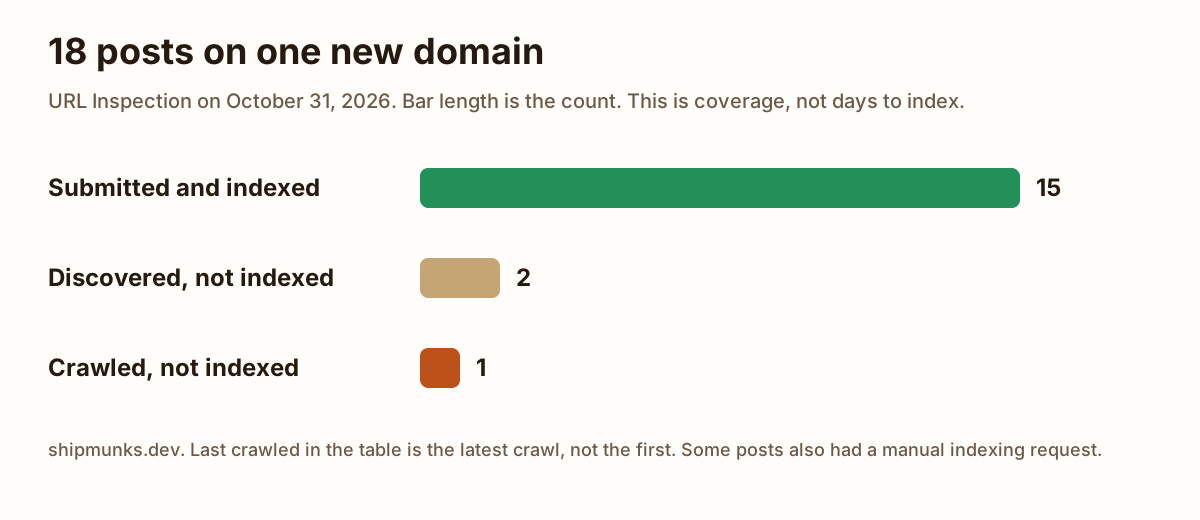
On this site the first post went up on October 23, 2026. The chart and the table are one URL Inspection snapshot of the shipmunks.dev Domain property, taken October 31, 2026. Published is the date on the post. Last crawled is the latest crawl on that report, not the first time Google fetched the page. Some of these posts also had a manual Request indexing click, and the snapshot does not say which. Eighteen posts on one new domain is a small sample, not a benchmark.
15 of the 18 were submitted and indexed. Two were still Discovered - currently not indexed: MRR vs ARR, published October 29, and Drizzle vs Prisma, published October 30. That is two days and one day after publishing, and neither had a crawl date. The newest, Claude Code slash commands, was published October 31, crawled that same day, and was not indexed yet.
| Post | Published | Coverage | Last crawled |
|---|---|---|---|
| How to get a new website indexed by Google | Oct 23, 2026 | Submitted and indexed | Oct 24, 2026 |
| Add an MCP server to Claude Code | Oct 24, 2026 | Submitted and indexed | Oct 24, 2026 |
| How to calculate MRR, and what not to count | Oct 24, 2026 | Submitted and indexed | Oct 24, 2026 |
| Lemon Squeezy fees: what you keep on a sale | Oct 24, 2026 | Submitted and indexed | Oct 25, 2026 |
| Sitemap could not be read: what to check first | Oct 24, 2026 | Submitted and indexed | Oct 27, 2026 |
| Supabase vs Firebase: the bill at 1k, 10k, 50k | Oct 24, 2026 | Submitted and indexed | Oct 27, 2026 |
| How to calculate churn rate when formulas disagree | Oct 25, 2026 | Submitted and indexed | Oct 28, 2026 |
| How to calculate NRR when formulas disagree | Oct 26, 2026 | Submitted and indexed | Oct 28, 2026 |
| SQLite vs Postgres, timed on one machine | Oct 26, 2026 | Submitted and indexed | Oct 28, 2026 |
| CAC payback period when the formulas disagree | Oct 27, 2026 | Submitted and indexed | Oct 28, 2026 |
| How to write a Claude MD file | Oct 27, 2026 | Submitted and indexed | Oct 28, 2026 |
| Claude Code subagents: the file, and when to use one | Oct 28, 2026 | Submitted and indexed | Oct 29, 2026 |
| Neon vs Supabase: free tier, price, and branching | Oct 28, 2026 | Submitted and indexed | Oct 29, 2026 |
| MRR vs ARR: the difference, and how to convert | Oct 29, 2026 | Discovered - currently not indexed | Never |
| SaaS directories: what 21 free submissions got us | Oct 29, 2026 | Submitted and indexed | Oct 29, 2026 |
| Dunning email templates, and what Stripe already sends | Oct 30, 2026 | Submitted and indexed | Oct 30, 2026 |
| Drizzle vs Prisma: bundle size and migrations, measured | Oct 30, 2026 | Discovered - currently not indexed | Never |
| Claude Code slash commands: built-ins and custom ones | Oct 31, 2026 | Crawled - currently not indexed | Oct 31, 2026 |
If you are still choosing the database behind the site, we priced Supabase vs Firebase at 1,000, 10,000 and 50,000 users.
When you start charging for the product, monthly recurring revenue is the number to keep. How to calculate MRR is the worksheet for it, including the payments that should stay out.
If you would rather ask than click around Search Console, ContextBolt SEO, which we make, can check a page’s index status from inside Claude. Add the MCP server to Claude Code first, then ask.
Sitemap could not be read: what to check first Couldn't fetch means Google did not get the file. Check the status code, the body, robots.txt, and redirects before you rewrite the XML. Guide Add an MCP server to Claude Code One local stdio server and one remote HTTP server, added with claude mcp add, plus the three scopes and the errors from a real run. Guide SaaS directories: what 21 free submissions got us 29 free directories tried on October 24 and 25, 2026, and which 21 were submitted. A link from a site Google already crawls can help a new domain get found. BlogFAQ
Does submitting a sitemap get my pages indexed?
No. It helps Google find them. Whether to index a page is Google’s decision.
Should I request indexing for every page?
No. There is a daily limit, and requesting the same URL again does not get it crawled any faster. Use it for the pages that matter most and let internal links carry the rest.
Do I need backlinks to get indexed?
Not strictly, but a few real links help Google discover a new domain sooner.
How do I get Google to recrawl an updated page?
Paste the updated URL into URL Inspection and click Request indexing. You need to be an owner or a full user of the property. There is a daily limit, and requesting the same URL again does not get it crawled any faster. For many updated pages, submit a sitemap instead. Google’s recrawl guide says crawling can still take a few days to a few weeks, and a request does not guarantee the page will be indexed.
Can you get Google to index a page instantly?
No. Google’s Indexing API can only be used to crawl pages with JobPosting markup, or BroadcastEvent embedded in a VideoObject. It schedules a crawl of those pages. It is not a way to index an ordinary page on the spot. IndexNow’s list of participating engines, checked October 31, 2026, names Bing, Yandex, Seznam.cz, Naver, Yep, Internet Archive, and Amazonbot. Google is not on that list.
What is the difference between crawling and indexing?
Crawling is Google downloading text, images, and video from a page. Indexing is Google analyzing that page and storing it so it can be returned in search. How Google Search works lists them as separate stages and says indexing is not guaranteed. A crawl does not mean the page will be indexed.
Why does my site not show up on Google if it is already indexed?
Indexed means Google stored the page. It does not mean the page shows for every query. How Google Search works says an indexed page can still be missing when it is not relevant to that query, when the quality is low, or when a robots rule blocks serving. A search for your site’s name and a search for a general phrase are different queries, so the page can appear for one and not the other. Search the exact URL to check the page itself. If URL Inspection says the URL is on Google and that search is empty, the URL Inspection help page says to check manual actions and security issues.
Sources
- Ask Google to recrawl your URLs (Google Search Central) Checked
- Add a website property to Search Console (Search Console Help) Checked
- Build and submit a sitemap (Google Search Central) Checked
- URL Inspection tool (Search Console Help) Checked
- Page indexing report (Search Console Help) Checked
- Block search indexing with noindex (Google Search Central) Checked
- Indexing API quickstart (Google Search Central) Checked
- In-depth guide to how Google Search works (Google Search Central) Checked
- Participating search engines (IndexNow) Checked